If you’ve ever searched for your name online, chances are Pipl has compiled a digital profile of you. Pipl aggregates information from public records, social media, and identity databases to power its people-search and fraud prevention tools. While this may benefit businesses, it can feel invasive for individuals who value their privacy.
Fortunately, Pipl allows users to file a Pipl opt out or submit a privacy request to delete or suppress their information. In this guide, you’ll learn exactly how to remove your personal data from Pipl, the differences between deletion and suppression, and what to expect after submitting your request.

Pipl.com Opt Out – Remove Your Information
To opt out of Pipl, visit the Pipl Privacy Request Form, verify your identity, and submit a removal request. You may need to provide your email and phone for confirmation. Once approved, Pipl will process your request within a few business days and remove your data.
What Is Pipl and Why Does It Collect Data?
Pipl is not a typical people-search site like Spokeo or Whitepages. Instead, it operates as an identity verification platform that businesses use for fraud prevention, background checks, and identity matching.
Pipl.com gathers data from:

- Public records (court filings, property records, voter registrations)
- Social media profiles
- Commercial databases
- Government filings
While this information is technically legal to collect, it raises serious concerns for individuals who do not want their personal data exposed.
Pipl Opt Out Guide: Remove Information from Pipl.Com
Here’s the step-by-step process to submit a Pipl removal request:
Step 1: Visit the Pipl Privacy Request Form
- Go to the official Pipl Privacy Request Form.
- This is where you’ll find the “Do Not Sell or Share My Information” option (required under CCPA for California residents).
Step 2: Choose Your Request Type
You’ll typically see three options:
- Delete My Data – Permanently removes your information from Pipl’s systems.
- Suppress My Data – Hides your profile from public view but retains it internally.
- Limit the Use of My Data – Restricts how Pipl can share your information.
Step 3: Verify Your Identity
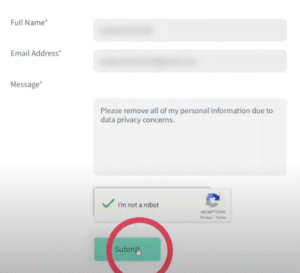
- Enter your full name, email, and phone number.
- Some requests may require a government ID to confirm identity (especially for deletion).
- This step prevents unauthorized opt-out attempts.
Step 4: Submit Your Request
- Once submitted, you’ll receive a confirmation email.
- You may need to click a verification link to validate your request.
Step 5: Wait for Processing
- Pipl generally processes requests within 7–14 business days.
- You’ll get a final confirmation email once your request is approved.
Pipl Opt Out Without an Account
You don’t need to create a Pipl account to opt out. Instead, use the privacy request form directly. However, be prepared to verify your identity with personal details to confirm ownership of the data being removed.
How Long Does Pipl Take to Remove Your Data?
- Email Confirmation: Usually sent within minutes.
- Processing Time: Around 7–14 business days, depending on request type.
- Permanent Deletion: May take longer if multiple records are linked.
Pipl Opt Out vs Delete vs Limit: What’s the Difference?
- Opt Out (Do Not Sell/Share): Stops Pipl from selling or sharing your data under CCPA.
- Delete My Data: Completely removes your profile from Pipl’s databases.
- Suppress My Data: Hides your profile but allows internal retention for fraud checks.
- Limit Use of Data: Restricts how businesses can use your data.
Choosing the right option depends on your privacy goals. If you want maximum protection, deletion is best.
What Happens After You Opt Out?
After completing the Pipl opt out identity verification, your record will either be:
- Removed entirely (if you choose deletion)
- Suppressed from public view (if you choose suppression)
Implications of Removing Data from Pipl
While removing your data improves privacy, it has trade-offs:
- Pros: Your personal details won’t appear in Pipl’s search results.
- Cons: If you use services that rely on Pipl for identity checks (e.g., fintech apps), you may experience delays or verification issues.
Your personal information is valuable—and sometimes vulnerable. If you don’t want your digital footprint exposed, filing a Pipl opt out request is an essential step toward regaining control. By following the process outlined above, you can ensure your details are either deleted, suppressed, or restricted according to your preference.
FAQs About Pipl Opt Out
How do I opt out of Pipl step by step?
Go to the Pipl Privacy Request Form, select “Do Not Sell or Share My Information” or “Delete My Data,” verify your identity, and confirm via email.
Does Pipl reject opt out requests outside California?
No. While the CCPA requires opt out for California residents, Pipl allows global opt-out requests through its form.
Can I opt out of Pipl without providing my phone number?
In most cases, both an email and phone number are required for verification. This prevents fraudulent removal attempts.
How long does Pipl take to confirm my opt out request?
Typically, 7–14 business days. You’ll receive an email confirmation once your request is complete.
What happens after Pipl verifies my identity?
Your data will be either deleted, suppressed, or restricted, depending on the option you selected in your request.