PeopleFinders.com allows anyone to look up personal details from public records, but it also provides an official, always-available way to suppress a profile via its online opt-out workflow. The fastest method is to get the exact profile URL, submit it on the PeopleFinders Opt-Out page, verify by email, and wait for removal processing to complete. Expect suppression (hiding data from public view) rather than full deletion from PeopleFinders’ systems, and revisit periodically to ensure the listing doesn’t reappear from refreshed public sources.
How do I cancel my PeopleFinders?

To opt out of PeopleFinders, first locate the exact profile URL on PeopleFinders.com, then open the official Opt-Out page, paste the URL, submit a request with an email address, and click the verification link emailed by PeopleFinders to confirm; processing can take several days and results in suppression of the profile from public view rather than full deletion from the database.
PeopleFinders opt-out overview

PeopleFinders is a data broker that aggregates public records and other licensed sources into people-search profiles, which can surface names, addresses, phones, and relatives in one place. While this data often originates from public sources, the aggregation creates a larger privacy risk—fortunately, PeopleFinders offers a self-serve, online opt-out to suppress listed profiles from public results. The process relies on an email verification step and typically requires repeating the workflow for each duplicate profile that exists for the same person.
Under U.S. privacy norms and California’s CCPA framework, PeopleFinders exposes “Do Not Sell My Personal Information” pathways and an Opt-Out form that work nationwide for profile suppression. Suppression removes the profile from public display while allowing PeopleFinders to retain limited data to honor the request and meet legal obligations; in practice, the effect for searchers is that the profile stops showing up on PeopleFinders and later drops from Google once search indexes refresh. Keep in mind that dozens of other brokers may still host similar data, so a broader removal strategy is recommended.

Step-by-step Instructions: How to remove info from PeopleFinders.com
The most reliable method is the official, email-verified workflow on PeopleFinders’ site, which can be completed in 10–15 minutes per profile.
1. Find the profile URL: Go to PeopleFinders.com, search by name and location, open the matching record, and copy the page URL from the address bar to submit with the request.
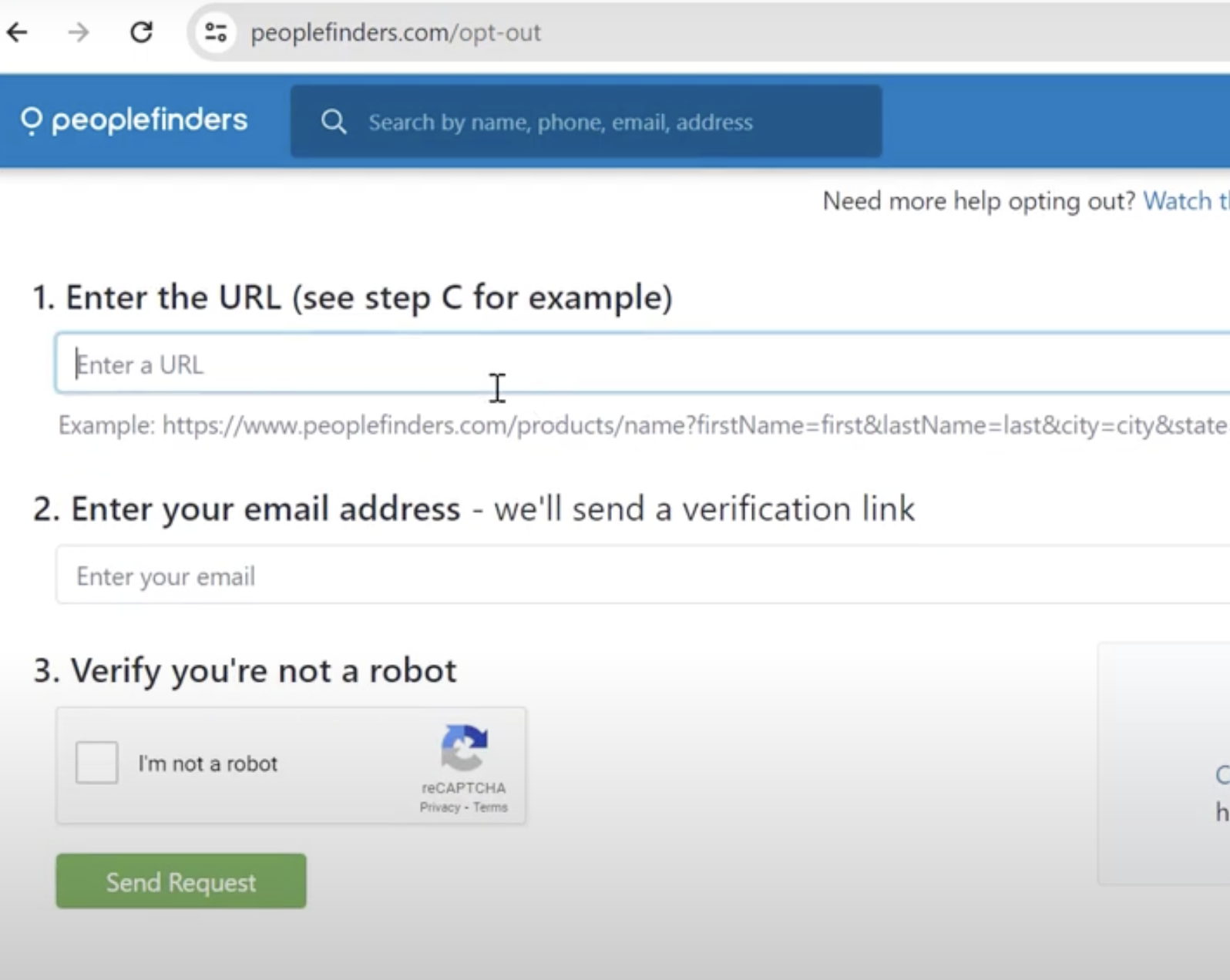
2. Submit the request: Open the PeopleFinders Opt-Out page, paste the profile URL, enter a working email address, complete the CAPTCHA, and send the request; watch for a confirmation email that contains the link to complete record suppression.
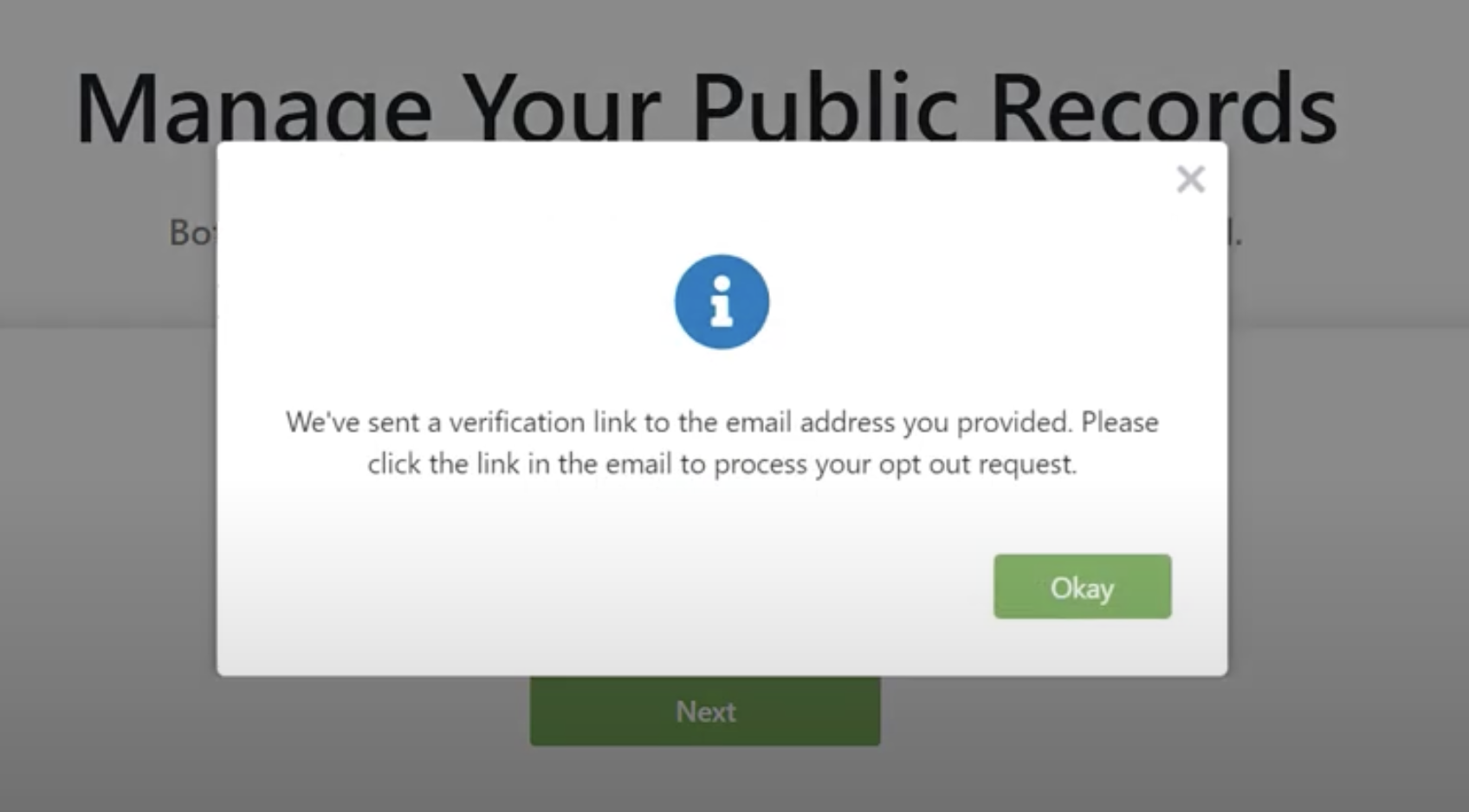
3. Verify email and complete suppression: Click the verification link within the email and finish any required form fields; links can expire, so complete promptly to avoid re-starting the process.
4. Processing and re-checks: Removals generally process within several days; revisit the profile URL or search again to confirm it no longer displays, and repeat for duplicates if necessary.
PeopleFinders links that matter
PeopleFinders.com maintains an official Opt-Out page where profiles are suppressed 24/7 after email verification, and a “Remove My Info” section that describes CCPA-related removal choices and account data practices. Consumers may also look for “Do Not Sell My Personal Information” or “Do Not Sell My Info” links surfaced to meet California requirements, which route into the same suppression flow.
Can this be done without a phone?
Yes, PeopleFinders’ primary opt-out flow is web-based and email-verified, so a phone is not required to complete the process; having a dedicated alias email for privacy is recommended. Some third-party guides also note a support phone line as an alternative path, but the standard online form remains the direct, always-available option for most consumers. If choosing phone support for complex or multiple records, confirm suppression by searching again after a few days.
Email removal tips
Using a unique alias or disposable email for data broker removals helps limit exposure of personal inboxes during verification. Ensure the temporary inbox remains active long enough to receive the confirmation link, and keep copies of profile URLs and confirmation messages for follow-up checks or re-requests if the listing reappears after future public-records refreshes.
What “Do Not Sell” means here
“Do Not Sell My Personal Information” and opt-out requests on PeopleFinders focus on suppressing public display and limiting sale/sharing of a consumer’s personal data. Suppression flags aim to block the profile from being shown or shared for marketing or people-search purposes while retaining minimal information necessary to honor the request and comply with laws or investigations.
How long removal takes and Google visibility
PeopleFinders typically processes requests within several days, though third-party guides advise allowing up to about a week or more before re-checking. Even after the profile stops displaying on PeopleFinders, its Google search result can linger until the index refreshes; using Google’s outdated content removal tool can speed de-indexing if a stale result persists.
Troubleshooting common issues
If the confirmation email never arrives, check spam folders, then resend from the PeopleFinders Opt-Out page and verify that the email address was entered correctly. For multiple or duplicate profiles, repeat the opt-out for each unique URL; if the listing persists after a week, contact PeopleFinders support or resubmit in case the verification link expired before completion.
Furure Privacy Strategy
After PeopleFinders Data Removal, audit other people-search and data broker sites, since similar listings often originate from the same public sources. Consider repeating manual removals or using a paid data removal service if time is limited; be aware that suppression across many sites reduces overall exposure even if some records reappear later from refreshed feeds.
FAQs Section
How do I find the exact profile link to remove?
Search by name and location on PeopleFinders, open the matching record, and copy the URL in the browser address bar before heading to the Opt-Out form.
Is this deletion or suppression?
PeopleFinders uses suppression to hide records from public results and limit selling/sharing, not full deletion from all systems.
Can I opt out for free?
Yes, the official online opt-out is free and available 24/7, requiring only email verification to complete.
Do I need to repeat the request?
If multiple profile variations exist, submit an opt-out for each distinct URL and re-check after processing completes.
Will results disappear from Google immediately?
Not always; Google can cache old results for a while, but they typically fall off after index updates or can be expedited with Google’s outdated content tool.